

FinTech Product design 04 April 2026

Zenxo

An F&O strategy builder and backtesting platform. Retail options traders assemble a multi-leg strategy and test it against years of historical market data before they put real money behind it. The strategy builder was nine form sections in one scroll, and it couldn’t express the relationships traders actually needed.

  • RoleUI/UX Designer
  • TimelineMay – Aug 2026
  • Team2 PM · 3 designers · 10 engineers
  • PlatformWeb
Zenxo strategy builder
Context

A strategy is a structure, not a form

A strategy runs four or five legs at once. Each leg carries its own entry, stop loss, target and re-entry rules, and strategy-wide rules sit on top of all of them. Some rules belong to a single leg. Others are shared across several: one stop loss governing two short legs, entry conditions shared across a group.

Traders kept asking for the same thing, and it wasn’t a shorter form. In a form, a shared rule is a checkbox list inside a panel, and it disappears the moment you close the panel. With three or four shared rules you can’t audit the strategy at all.

Research notes from trader conversations
Research · trader conversations
Most users aren’t expert traders, so the product has to be powerful enough to do the real work and simple enough to trust.
Problem

Nine sections. One scroll.

You hit twenty-five controls under “Overall Settings” before you described a single leg. Nothing told you where you were or how much was left. Legs sat below as stacked, independent form blocks.

The deeper limit wasn’t length, it was capability. A form can list settings; it can’t show relationships.

Traders kept using one word for it: overwhelming.

Before · the nine-section scroll
Approach

Draw the shape of the strategy

Entries sit above, legs run across, exits sit below. A shared rule becomes a single node wired to its members and labels itself with how many legs it covers. A leg with nothing beneath it is visibly a leg with no exit.

Changing one number on a canvas is slow, and traders optimise for speed, so the form stayed the default and the canvas became its live mirror. It can’t drift from the form, because it reads the same data.

Wiring a shared rule · the node labels itself
Say it, and the canvas builds itself

Zenbot turns a sentence into structure. Ask for a 30% stop loss on both legs and the canvas acknowledges the moment you hit send, then the blocks arrive one after another, already wired onto the legs they belong to. No form to fill in, no mode to switch into.

Decisions

Two calls that set the shape of the product.

Decision 01

More freedom was the version nobody would learn

The empty + Exit slot doubles as the affordance and the warning.

  • Option A · Drag-to-reveal connectors

    Expressive, and closer to how node editors work. But it puts a learning curve in front of the thing meant to simplify the product.

  • Option B · A button on the block itself

    Click + Exit and an exit appears. Less elegant, zero discovery cost.

  • Chosen · B

    Every leg carries its own + Entry and + Exit, so the next move sits on the thing it applies to. The interface teaches itself as you use it.
Decision 02

A form can list settings. It can’t show relationships.

The split screen is the product’s defining layout: you see the structure while you build it.

  • Option A · Form plus grouping checkboxes

    Cheapest to build, and what every competitor ships. Close the panel and the relationship vanishes.

  • Option B · A canvas of nodes and wires

    A shared rule becomes a permanent shape. Costs a new interaction model, and a much harder build.

  • Chosen · B, on a split screen

    A narrow form was the harder sell: a wide form makes the eye travel, and every trip costs time. That reclaimed space is what lets the canvas sit beside it.

Results page

Twenty-one panels deep, still guessing

Every card had the same border, the same padding, the same importance. Net profit sat in a tile the size of the worst losing streak. Scroll far enough and a pink box said the strategy would lose money over time, in the same treatment as everything above it.

A trader opens a backtest to answer one question: should I run this.

Before · twenty-one equal panels

A descending funnel

The headline verdict comes first, then shape over time, then patterns, then the raw evidence. The reader picks how deep to go. Exit reasons are broken out by type, and insights are labelled by their coloured tab before you read a word.

The data shown is demo data. The backtesting engine is the backend team’s work.

After · the page walked top to bottom
Mascot

Meet Zen

We gave the assistant a face. Zen is a dark rounded square with two eyes and a soft orange glow. It works as a small icon in the chat and as a big character on the website.

Zen · from wireframe to mascot. It blinks, and its eyes follow your cursor

Zen in the chat

In the strategy chat, Zen sits next to every reply as a small icon. Ask for a change, and Zen answers with a card that lists exactly what it updated.

Zen in the chat · a reply, played on a loop
What changed

Every card looked full, even when it was empty

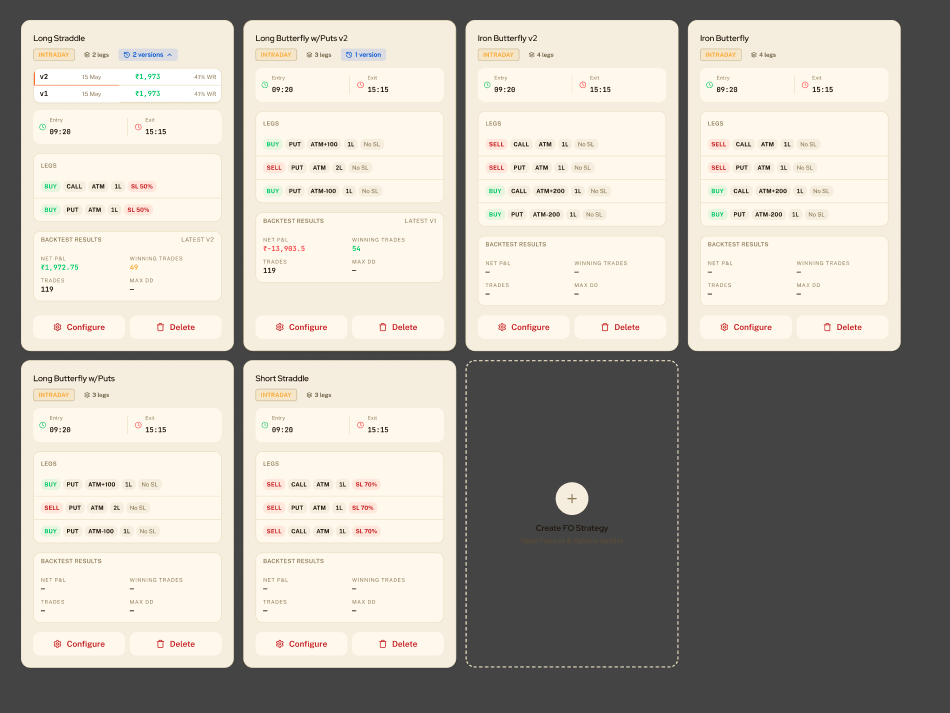
The old strategy cards showed everything at once: legs, entry and exit times, and a results box. A strategy that had never been tested still got that box, filled with dashes. Configure and Delete sat side by side at the same size.

The old strategy cards: cream boxes with legs, entry and exit times, and results boxes full of dashes
Before · the old strategy cards

One number first, and a card that waits for you

The new card leads with the one number traders check first: net profit. Wins, trades and drawdown sit under it, then the P&L curve, then the legs in tabs of four. View results is the main button. Delete shrinks to a small icon, and versions fold into one pill.

A strategy that hasn’t been tested yet doesn’t get empty dashes any more. It gets a short line, “Take a breath, your backtest is ready to go”, and a small animation: a gear turning slowly while orange dots circle it on three rings. It shows the card is ready and waiting, not broken. There is one button, Configure.

Double Diagonal1 Version
₹73,863.44NET P/L
WINS15TRADES25MAX DD-
LEGS 1SELL1xATMCE
LEGS 2SELL1xATM +100CE
LEGS 3BUY1xATM -100CE
LEGS 4BUY1xATM -100CE
After · the new card. Point at delete, open versions, switch tabs, or flip it to “Not tested yet”
System

Nothing decorates

There’s one accent colour, and it’s rationed: orange means “act here” or “you are here”, and nothing else. Motion reports state: the orbiting dots stall when the strategy does, and a pulse runs along the wires when a rule is grouped. The assistant has intent instead of jargon. The form and the canvas use the same components because they read the same data. 26 strategy templates, 24 supported brokers.

What’s next

Two things are still open. First, when two shared rules cover some of the same legs, the canvas can’t fit both on one line, so it pushes one of them down to a second row. Traders can still read it, but it’s the messiest the canvas gets.

Second, smaller screens. The form keeps its width, so the canvas is the part that has to shrink and rearrange itself to fit laptops and tablets.